
In this section
Forward webhooks to your own API, or to several places
Relay each webhook unchanged to your server, staging or a second system, with its signature still valid. Or reshape it on the way. One URL can send to several destinations.
Many services let you register only one webhook URL. If a second system needs the same events, such as staging, a replacement you're moving to, or a colleague's environment, register your webhook.stream URL once and forward from there. Each destination is one automation.
Before you start
- Destinations must be public HTTPS addresses on the standard port. Local addresses, IP addresses and private networks are refused. For a server on your own machine, see Forward webhooks to localhost.
- Each destination is one automation. A free URL can have 3, and a URL with a Pro pass can have 10.
Forward a webhook unchanged
- Click Automations in the toolbar.
- Under Add an automation, choose Forward to my API.
- Give it a Name, such as "Staging".
- Paste your server's address under URL.
- Leave the two settings the preset chose:
- Pass along the sender's headers (signatures included) is on.
- Original body, untouched is selected under 3 With this body.
- Select a captured request in the list, then click Send test.
- Click Save.
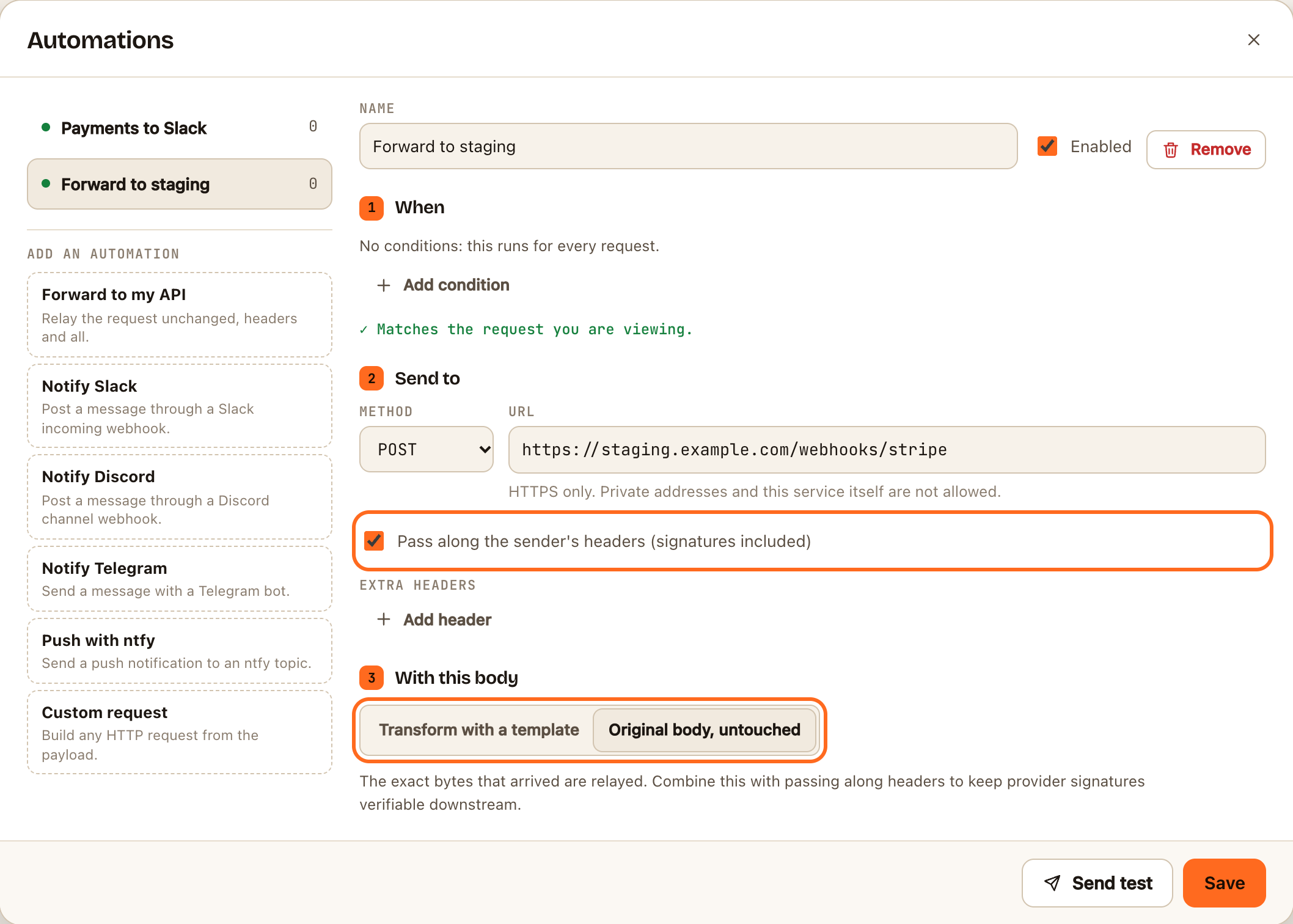
With those two settings, your server receives the same body bytes and the same signature header the service sent. It can verify the signature with the same signing secret, so your code doesn't change.
Send to several places
Repeat the steps above for each destination. When a request arrives, every automation whose conditions match runs at the same time and independently: a slow or broken destination doesn't hold up the others.
You don't have to send everything everywhere. Give each automation its own conditions, for example:
| Destination | Condition |
|---|---|
| Production API | None: everything |
| Staging API | body.livemode equals false |
| Billing service | body.type starts with invoice. |
See Choose when an automation runs.
Reshape on the way
If the destination expects a different format, choose Transform with a template under 3 With this body and write the body it expects. See Write a template. The original signature won't match a changed body, so authenticate with a header instead: add one under Extra headers, such as Authorization: Bearer ….
What your server receives
As well as the service's own headers, every delivery carries these, so you can always tell where it came from:
| Header | Value |
|---|---|
User-Agent |
webhook.stream/1.0 and a link to the docs |
X-Webhook-Stream-Endpoint |
The ID of your webhook URL |
X-Webhook-Stream-Request |
The ID of the captured request, useful for spotting duplicates |
X-Webhook-Stream-Hop |
1. A request arriving with this header is recorded but never forwarded again, so two URLs can't loop |
Things worth knowing
- The service no longer sees your server's answer. Your webhook.stream URL answers it straight away, so if your server fails, the service won't retry. The failure is shown on the request's Deliveries tab, but nothing sends it again for you.
- Use this for copies, not for the one system that must never miss an event. Where you can, keep that system registered with the service directly, and forward copies to the others.
- Twilio signatures won't verify after forwarding, because Twilio signs the address it called, and your server's address is different.
- Redirects aren't followed. If your server answers with a redirect, the delivery is logged as failed. Use the final address.
- Each destination uses a delivery. Three destinations use three deliveries per request out of the daily allowance.