
In this section
Forward webhooks to localhost
Receive real webhooks on a server running on your own machine with one command. No tunnel and nothing to install; it needs Node.js 20 or newer and only makes outbound connections.
Services can only send webhooks to public addresses, and your development server isn't one. The forwarder closes the gap: it follows your webhook URL and replays each request against your local server the moment it arrives.
Before you start
- Node.js 20 or newer on the machine running your server. Check with
node --version. - Your server running, and the address of the route that handles webhooks, such as
http://localhost:3000/webhooks. - Your webhook URL registered with the service. Leave it there: you won't need to change it again between sessions.
Start forwarding
- In the inspector, click Stream. The Forward to localhost tab opens.
- Under Your local endpoint, type your server's webhook address.
- Click Copy next to the command. It already contains your URL's ID and key.
- Paste it into a terminal on your machine and press Enter.
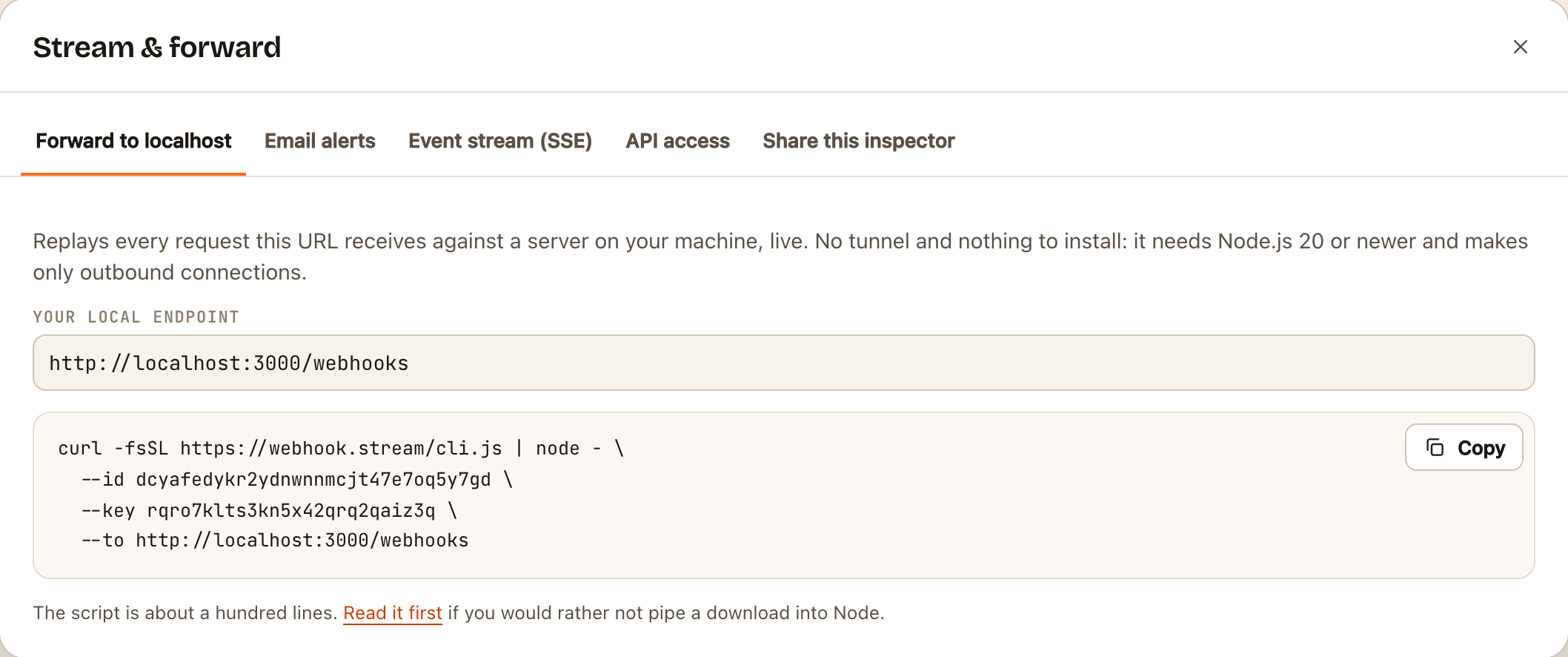
The command looks like this:
curl -fsSL https://webhook.stream/cli.js | node - \
  --id YOUR_ID \
  --key YOUR_KEY \
  --to http://localhost:3000/webhooks
It prints Forwarding … (Ctrl+C to stop) and then one line for each request it forwards, with your server's status code and how long it took.
The script is about a hundred lines with no dependencies. To read it before running it, open webhook.stream/cli.js, or save it and run node cli.js with the same options.
Check it worked
Trigger an event in the service, or click Send sample in the inspector. The request appears in the inspector, a line appears in the terminal, and your server receives it.
How it behaves
- Everything is passed on: the method, headers and body. The path and query string are added to your address, so a request to
…/your-id/stripereacheshttp://localhost:3000/webhooks/stripe. - Signatures still verify with the same signing secret, because the body and signature header are unchanged. Timestamped signatures, like Stripe's and Slack's, are fresh because the request is forwarded as it arrives.
- The service never waits for your machine. It gets its answer from your webhook URL straight away. So a breakpoint in your code can't cause a timeout or a flood of retries. It also means the service never sees your server's answer.
- Only new requests are forwarded. Requests that arrived before you started aren't sent. To replay one of those, use its cURL button. See Replay or export a request.
- It reconnects by itself if your connection drops, and forwards what arrived in the meantime.
- It stops when you press Ctrl+C, or when the URL expires or is deleted.
- Only outbound connections, so it works behind firewalls and on networks that block incoming traffic. Nothing on your machine is exposed to the internet.
If something goes wrong
| The terminal shows | Means |
|---|---|
Cannot follow this endpoint (401) |
The key is wrong. Copy the command again from Stream |
Cannot follow this endpoint (404) or (410) |
The URL has expired or been deleted |
→ failed: ECONNREFUSED |
Nothing is listening at your local address. Check the port, and that your server is running |
→ 404 |
Your server is running, but not at that path |
note: … was larger than the stored limit |
The body was cut short when stored, so only the stored part is forwarded |
Does the service need your server's actual answer, for example Twilio reading the reply your code generates? Then you need a tunnel to your machine, or a fixed reply set under Response.