
In this section
Write a template
Reshape a webhook into the body another service expects. Pick fields with double braces, adjust them with filters, and keep numbers, lists and objects as they are. A full reference.
A template is the body you want to send, with gaps that are filled in from the incoming request. You use templates in automation bodies, in automation header values, and in your URL's response.
Placeholders
Write the path to a value in double braces. Wherever the placeholder is, the value from the request goes in.
| Placeholder | Becomes |
|---|---|
{{body.customer.email}} |
A field from the JSON or form body |
{{body.items[0].sku}} |
An item in a list, by position, starting at 0 |
{{body["user.name"]}} |
A key that contains a dot or other punctuation |
{{headers.x-github-event}} |
A request header, in lower case |
{{query.page}} |
A query string parameter |
{{raw}} |
The whole body as text, exactly as received |
{{request.id}}, {{request.method}}, {{request.path}}, {{request.url}} |
Details of the request |
{{request.ip}}, {{request.country}} |
Where it came from |
{{request.timestamp}} |
When it arrived, as an ISO 8601 date |
{{provider}}, {{event}} |
The sender and event as recognised by webhook.stream |
{{endpoint.url}} |
Your webhook URL |
A value that isn't in the request comes out empty in text, and as null in JSON.
Filters
Add a filter after a pipe to adjust a value. Several filters run left to right: {{body.email | trim | lower}}.
| Filter | Does |
|---|---|
default: "unknown" |
Uses the text given when the value is missing or empty |
upper, lower, trim |
Changes case, or removes spaces at the ends |
truncate: 200 |
Shortens text to a number of characters |
number, string |
Turns text into a number, or a value into text |
json, pretty |
Writes a value out as JSON, compact or indented |
length |
Counts the items in a list, or the characters in text |
first, last |
The first or last item of a list |
join: ", " |
Joins a list into text |
keys |
The names in an object |
iso |
Turns a Unix timestamp or a date into ISO 8601 |
urlencode, base64, escape |
Encodes for a URL, as base64, or for XML |
JSON templates keep types
When the content type is JSON and the template is valid JSON, two useful things happen:
- A value that is exactly one placeholder keeps its type.
"{{body.total}}"becomes the number129, not the text"129", and"{{body.items}}"becomes the whole list. - Special characters are handled for you. A customer name with a quotation mark in it can't break the JSON.
For example, this template:
{
  "id": "{{body.id}}",
  "total": "{{body.total}}",
  "items": "{{body.items}}",
  "note": "Order {{body.id}} from {{body.customer.email | lower}}"
}
sends this:
{
  "id": "ord_8f3k2",
  "total": 129,
  "items": [{ "sku": "KB-75", "qty": 1 }],
  "note": "Order ord_8f3k2 from [email protected]"
}
For other content types, such as text/plain or application/x-www-form-urlencoded, the template is plain text with values pasted in. Use urlencode for form values and escape for XML.
Write one against a real request
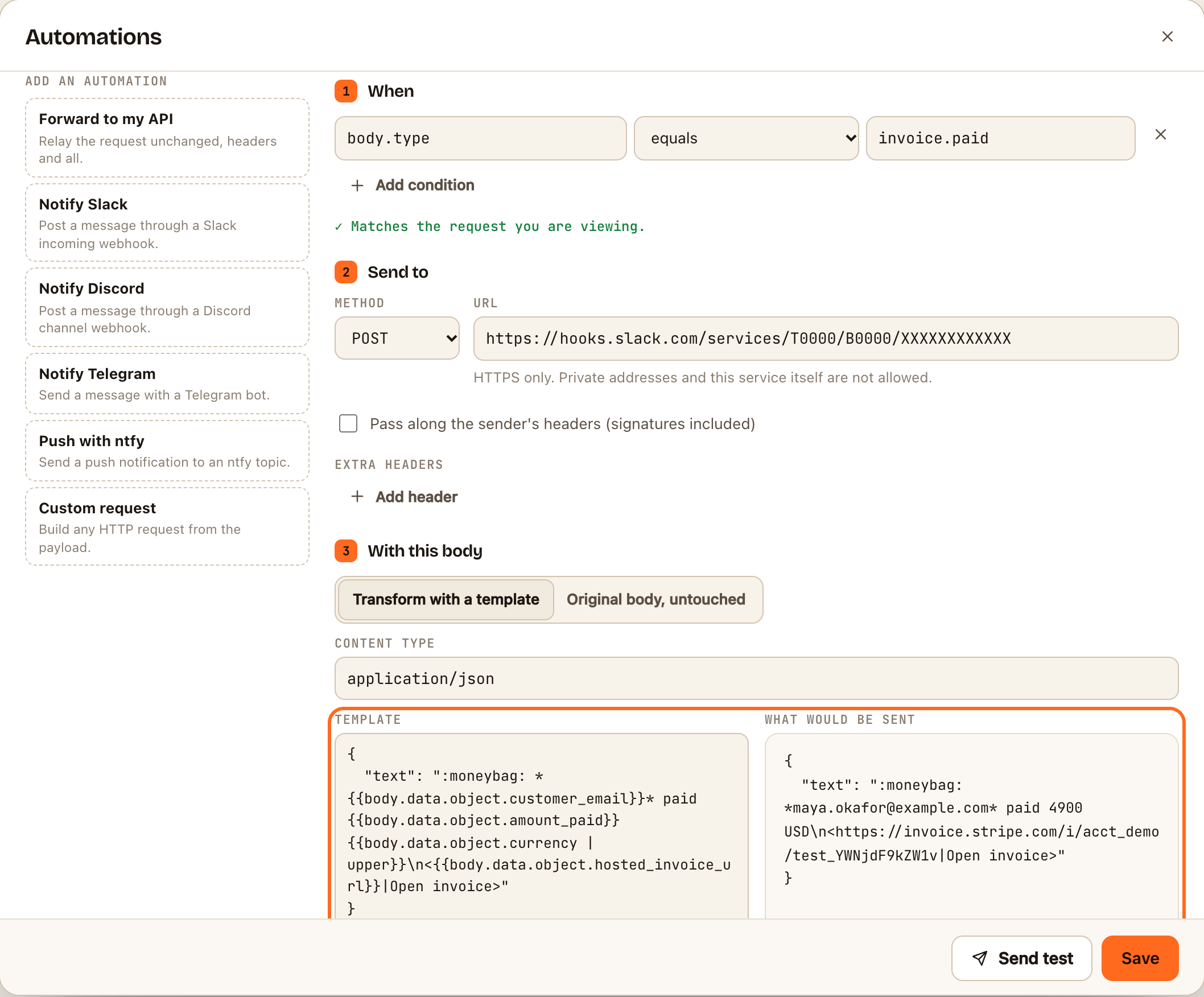
- Select a captured request in the list.
- Open Automations (or Response).
- Write the template. The preview beside it, What would be sent (or Preview in Response), updates as you type, using the selected request.
What templates can't do
Templates aren't a programming language, which keeps them fast and predictable. There are no loops, no arithmetic and no if/else.
| You want to | Do this instead |
|---|---|
| Send something different depending on a value | Two automations with opposite conditions |
| Reformat every item in a list | Pass the list through whole, or use length, first and join |
| Turn cents into dollars | Send the number as it is and say what the unit is |
If something goes wrong
- "Unknown filter". Check the spelling against the table above.
- A value comes out empty or null. The path doesn't match the request. Compare it with the Body tab, and remember that header names are lower case.
- A template is limited to 16 KB.