
In this section
Send webhooks to Slack, Discord, Telegram or ntfy
Post a readable message to a Slack or Discord channel, a Telegram chat or your phone whenever a webhook arrives. Where to get each destination URL, and a message template for each.
Turn webhooks from any service into messages people will read. Each destination has a starting point in Automations with a basic message already written. You add the destination's address, filter, and reword the message.
Get the destination's address
| Destination | Where to get it | It looks like |
|---|---|---|
| Slack | Create an app at api.slack.com, turn on Incoming Webhooks, and add one to a channel | https://hooks.slack.com/services/… |
| Discord | In the channel's settings, Integrations → Webhooks → New Webhook, then Copy Webhook URL | https://discord.com/api/webhooks/… |
| Telegram | Message @BotFather, send /newbot and copy the token. Then send your bot a message and find your chat ID |
https://api.telegram.org/bot<token>/sendMessage |
| ntfy | Install the ntfy app and subscribe to a topic with a long, random name | https://ntfy.sh/<your-topic> |
Treat these addresses as passwords. Anyone who has one can post to your channel or chat. On ntfy's public server, anyone who knows the topic name can read it, which is why it should be long and random.
Set it up
- Send one real event from the service to your webhook URL, and select it in the list.
- Click Automations.
- Under Add an automation, choose Notify Slack, Notify Discord, Notify Telegram or Push with ntfy.
- Paste the address under URL.
- Under 1 When, add conditions so the channel only hears what matters. See Choose when an automation runs.
- Under Template, write the message. Use fields from the request in double braces. Check What would be sent.
- Click Send test. The message arrives in the channel.
- Click Save.
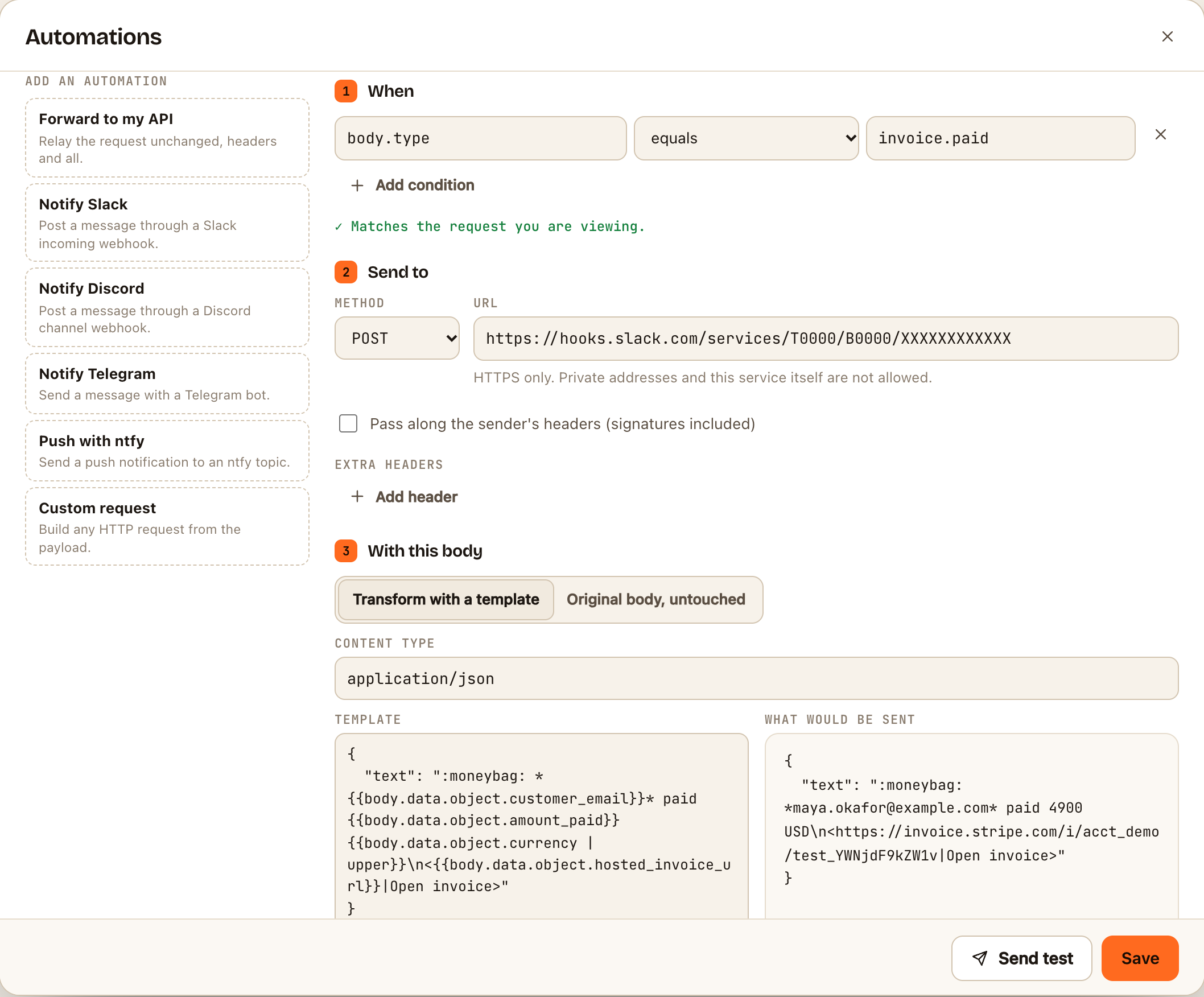
Message templates to start from
Slack. The message goes in text. *bold* and <link|label> work:
{
  "text": ":warning: Payment failed for *{{body.data.object.customer_email}}*\n<{{body.data.object.hosted_invoice_url}}|Open invoice>"
}
Discord. The message goes in content, up to 2,000 characters. **bold** works:
{
  "content": "**{{body.repository.full_name}}** released {{body.release.tag_name}}\n{{body.release.html_url}}"
}
Telegram. Replace YOUR_CHAT_ID with your chat's ID. Plain text is safest: with Telegram's formatting modes, an unescaped character in a product name makes Telegram reject the message.
{
  "chat_id": "YOUR_CHAT_ID",
  "text": "New order {{body.name}}: {{body.total_price}} {{body.currency}}"
}
ntfy. The body is plain text. Add a title and other options as headers under Extra headers, such as Title, Priority and Tags:
New order {{body.name}}: {{body.total_price}} {{body.currency}}
Use | truncate: 300 on anything a person typed, such as a commit message, so long text doesn't flood the channel. See Write a template.
Check it worked
The test message appears in the channel. Afterwards, each request's Deliveries tab shows whether its message was delivered. Slack answers 200, Discord 204, and Telegram and ntfy 200.
If something goes wrong
| You see | Usually means |
|---|---|
Slack: 404 or no_service |
The Slack webhook was removed. Create a new one |
Discord: 400 |
The body isn't what Discord expects. The reply under Deliveries names the field |
Telegram: chat not found |
The chat ID is wrong, or nobody has messaged the bot yet |
Telegram: 401 |
The bot token in the URL is wrong |
Any: 429 |
The chat service is rate-limiting a burst of messages. Those messages are lost |
See Automation deliveries are failing.