
In this section
Choose when an automation runs
Use conditions to run an automation only for the webhooks that matter, by event type, amount, branch, header, path or query parameter. Every operator explained, with examples.
Conditions decide which requests an automation acts on. Services let you choose which kinds of event to send, but rarely which ones: only failures, only production, only above a certain amount. Conditions do that.
How a condition works
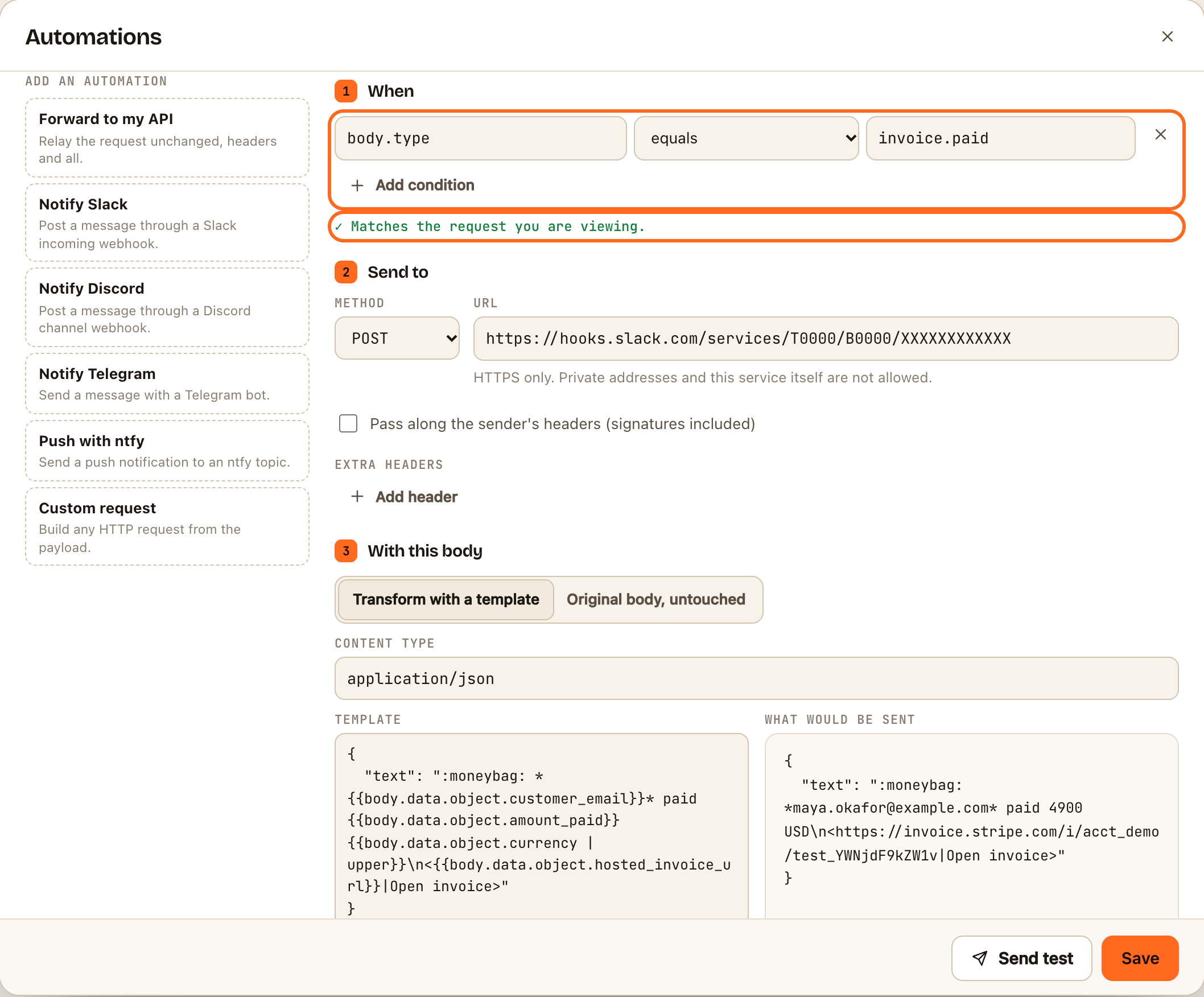
Each condition has three parts:
- A field: where to look in the request, such as
body.type. The box suggests fields from the request you have selected. - An operator: how to compare.
- A value: what to compare with.
An automation runs only when all of its conditions hold. With no conditions, it runs for every request.
The operators
| Operator | True when |
|---|---|
| equals / does not equal | The field is exactly the value |
| contains / does not contain | The value appears anywhere in the field |
| starts with / ends with | The field begins or ends with the value |
| exists / does not exist | The field is present and not empty. No value needed |
| is greater than / is less than | Both sides compared as numbers |
Comparisons are case-sensitive: Failed doesn't equal failed. To ignore case, add | lower to the field and write the value in lower case, for example body.status | lower equals failed. Fields can use any of the template filters this way, such as body.items | length is greater than 3.
Where to look
| Field | Means | Example |
|---|---|---|
body.type |
A field in the JSON or form body. Use dots to go deeper | body.data.object.amount |
body.items[0].sku |
An item in a list, by position, starting at 0 | |
headers.x-github-event |
A request header, in lower case | headers.x-shopify-topic |
query.env |
A query string parameter on your URL | query.source |
request.path |
The path after your URL's ID | /stripe |
request.method |
GET, POST and so on |
|
provider, event |
The sender and event as recognised by webhook.stream | stripe, invoice.paid |
Examples
| You want | Field | Operator | Value |
|---|---|---|---|
| Only one kind of event | body.type |
equals | invoice.payment_failed |
| A family of events | body.type |
starts with | customer.subscription. |
| Only live mode, not tests | body.livemode |
equals | true |
| Only above an amount | body.data.object.amount |
is greater than | 10000 |
| Only pushes to main | body.ref |
equals | refs/heads/main |
| Only a GitHub event | headers.x-github-event |
equals | release |
| Only requests with an email | body.customer.email |
exists | |
| Ignore one service's health checks | request.method |
does not equal | GET |
Several services on one URL
Give each service a different path on the same URL, such as https://in.webhook.stream/your-id/stripe and …/your-id/github. Then use request.path equals /stripe in one automation and /github in another.
"Either this or that"
Conditions in one automation must all hold. For "either", create two automations with the same destination and body, one for each case. When the cases share a beginning, one starts with condition may cover both.
Check it worked
Select a request that should match. The line under the conditions says ✓ Matches the request you are viewing. Then select one that shouldn't, and check it says ✕ Does not match.
If something goes wrong
- It never matches. Compare the field name with the request's Body or Headers tab. Header names are always lower case in conditions.
- A number comparison doesn't work. is greater than and is less than need numbers on both sides. A missing field never matches.
- Too many conditions. An automation can have up to 10.