
In this section
How long a URL lasts, and how to delete it
Every webhook URL has an expiry. What happens when it's reached, how to see the time left, how to clear requests or delete a URL early, and how to keep one longer.
Every webhook.stream URL is built to disappear. You choose its lifetime when you create it, and when that time is up the URL stops working and everything it caught is erased, without anyone having to remember to do it.
How long a URL lives
| URL | Lifetime |
|---|---|
| Free, made on the home page | 1 hour, 1 day, 3 days or 7 days, chosen under Keep it for |
| Free, made with New URL in the inspector or top bar | 7 days |
| With a Pro pass | Its current time, plus 30 days or 1 year for each pass bought |
The time left is shown next to the URL in the inspector, for example 6d 23h left. It's highlighted in the last 6 hours. Hover over it to see the exact date and time.

A free URL's lifetime can't be changed after it's made. To keep it longer, buy a Pro pass from Keep longer next to the time left. See Keep a URL longer with a Pro pass.
What happens at expiry
- The URL stops accepting requests. Anything sent to it gets a
410 Goneanswer, so the sending service knows it's no longer there. - Every captured request, response setting and automation on it is erased.
- The inspector shows This URL has expired or was deleted, with a button for a new one.
- A new URL is a new address. Remember to update it at the services you gave the old one to.
Clear requests, but keep the URL
- In the inspector, click ⋯ (more) at the end of the toolbar.
- Click Clear requests.
- Confirm with Clear requests.
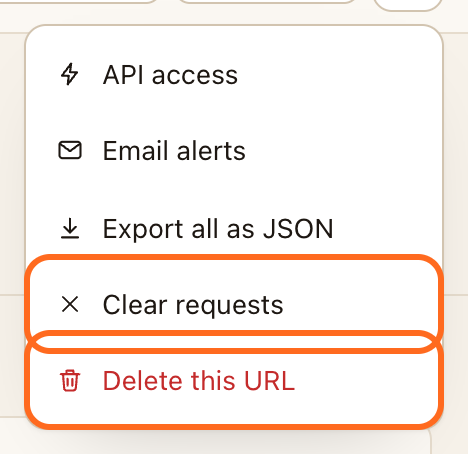
Every captured request is deleted. The URL, its response and its automations keep working.
To delete a single request, open it and click the bin at the top right.
Delete the URL early
- Click ⋯ (more), then Delete this URL.
- Confirm with Delete URL.
The URL stops accepting requests straight away and everything it caught is erased. This can't be undone, and a Pro pass on the URL ends with it.
Check it worked
After deleting, the inspector shows This URL has expired or was deleted. Sending a request to the old URL returns 410.