
In this section
Open your inspector on another device, or share it
Your browser remembers the URLs you create. To open one on another computer or give a colleague access, copy its full dashboard link from Stream, Share this inspector.
There are no accounts on webhook.stream. Instead, each URL has a private dashboard link, and anyone who opens that link sees the inspector for that URL. Your own browser remembers the URLs you create, so you only need the link to open one somewhere else.
Before you start
- The dashboard link is not the webhook URL. The webhook URL (
https://in.webhook.stream/…) only receives requests. The dashboard link (https://webhook.stream/inspect/#…) reads them and changes settings. Treat it like a password. - Anyone with the dashboard link can read every request the URL receives, change its response and automations, and delete it.
Get back to a URL in the same browser
- Go to webhook.stream/inspect/. The URL you used most recently opens.
- If you've made more than one, pick another from the URL picker at the top left. Each shows how much time it has left.
The browser remembers up to 20 URLs and forgets each one when it expires. Private or incognito windows forget them when closed.
Open it on another device, or share it
- In the inspector, click Stream.
- Open the Share this inspector tab.
- Click Copy next to the link.
- Open the link on the other device, or send it to the colleague who needs it, over a private channel.
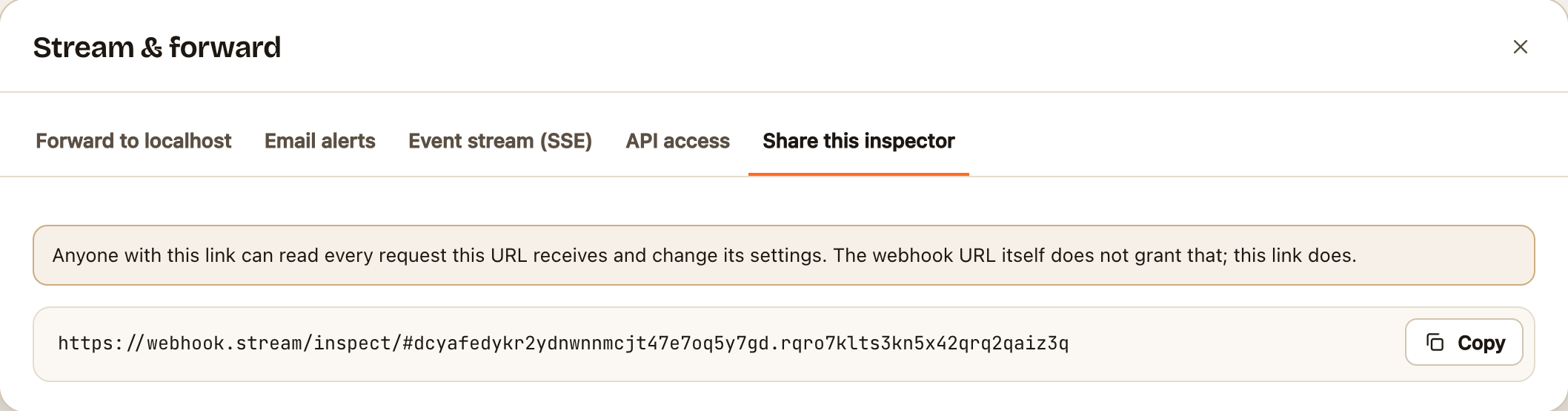
The link must be copied in full, including everything after the #. That part holds the key, and it's never sent to the server when the page loads.
Check it worked
On the other device the inspector opens on the same URL, with the same requests. Both stay in step: a request appears on both at the same moment.
If something goes wrong
- "This link cannot open the inspector". Part of the link is missing, usually the end. Copy it again from Share this inspector. See The inspector won't open my URL.
- You've lost the link and cleared your browser. There's no way to recover it: webhook.stream doesn't know who made a URL. Create a new one, and update the service that sends to it.
- You shared the link with the wrong person. Delete the URL (⋯ → Delete this URL) and create a new one. A dashboard link can't be changed on its own.