
In this section
Set a custom response
Choose the status, content type, headers, body and delay your webhook URL answers with. The body is a template, so it can echo parts of the request back.
By default a webhook URL answers every request with 200 OK and a small JSON body. You can change that answer: to pass a service's verification check, to imitate your real server, or to see how a service behaves when things go wrong.
Before you start
- One response applies to every request the URL receives. The body is a template, though, so it can include values from each request.
- The request is always recorded and your automations always run, whatever the response says.
Set the response
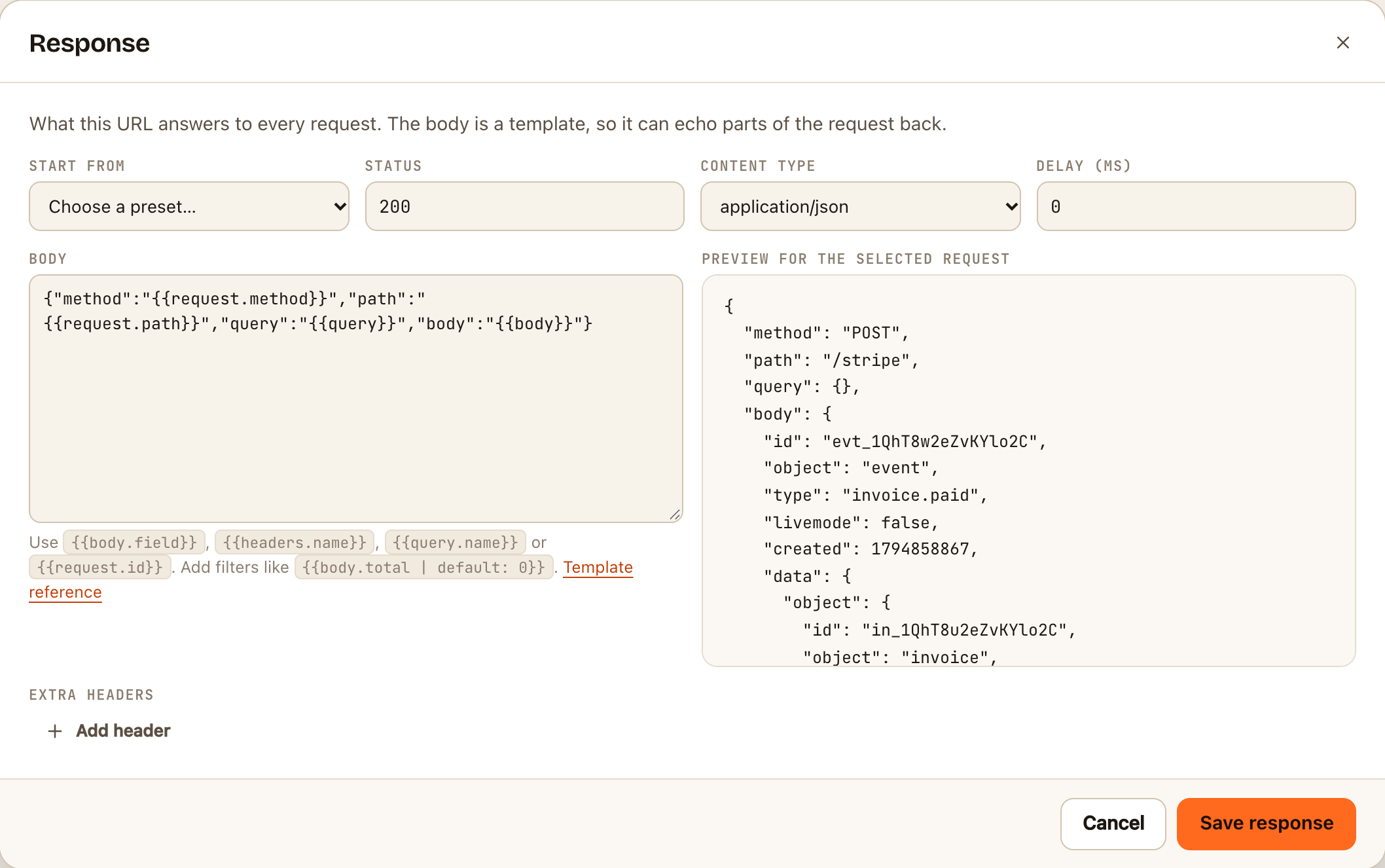
- In the inspector, click Response in the toolbar.
- To start from something ready-made, pick one under Start from:
| Preset | Answers |
|---|---|
| Acknowledge (default) | 200 with {"ok":true,"id":"…"} |
| Slack URL verification | Slack's challenge value, as JSON |
| Meta / WhatsApp verification | The hub.challenge query parameter, as plain text |
| Microsoft Graph validation | The validationToken query parameter, as plain text |
| Twilio TwiML reply | A TwiML message that replies to an incoming SMS |
| Simulate a failure | 500 with an error body |
| Echo the request | The method, path, query and body, as JSON |
- Adjust any of the fields:
- Status: any code from 200 to 599.
- Content type:
application/json,text/plain,application/xml,text/xml,application/x-www-form-urlencodedortext/csv. - Delay (ms): wait up to 10,000 milliseconds before answering.
- Body: the text to send. Put values from the request in double braces, such as
{{body.id}}or{{query.token}}. See Write a template. - Extra headers: click Add header for each one.
- Check Preview on the right. It shows the body as it would be sent for the request you have selected, or for a sample request if none is.
- Click Save response.
Check it worked
Click Send sample, or send the URL a request with cURL. Look at the response your client receives: it has the status, headers and body you set. While the status isn't 200, it's shown on the Response button as a reminder.
What a response can't do
These limits stop test URLs being used to host web pages or send visitors elsewhere:
- No HTML. It isn't one of the content types.
- Only some headers.
Cache-Control,Retry-After,ETag,Last-Modified,Vary,Content-Language,Request-ID,Idempotency-Key, theRateLimit-headers and your ownX-headers are allowed. Redirects (Location), cookies and authentication prompts aren't. - No logic. The same template applies to every request. It can't answer differently depending on a value.
If something goes wrong
- "That content type is not available". Pick one from the list.
- "The … header cannot be set here". That header isn't on the allowed list.
- A placeholder comes out empty. The field isn't in the request, or its name is spelled differently. Select a real request first, then check the preview.