
In this section
Pass a verification handshake (Slack, Meta, WhatsApp, Microsoft Graph)
Some services check your URL before they send it anything, by asking it to echo a challenge. Set the matching response preset and the check passes.
A few services won't save a webhook URL until it proves it's listening. They send a challenge value and expect the URL to send it straight back. A new webhook.stream URL just answers 200 with its own JSON, so the check fails until you set the right response.
Before you start
- Set the response first, then save the URL in the service. The check happens the moment you save.
- Know which service you're connecting. Each one asks differently:
| Service | How it checks | Preset to use |
|---|---|---|
| Slack (Events API) | A POST with "type": "url_verification" and a challenge in the JSON body |
Slack URL verification |
| Meta: WhatsApp, Instagram, Messenger, Facebook | A GET with hub.mode, hub.challenge and hub.verify_token in the query string |
Meta / WhatsApp verification |
| Microsoft Graph subscriptions | A POST with validationToken in the query string, to be answered within 10 seconds |
Microsoft Graph validation |
Set up the handshake
- Create a webhook URL, or open the one you'll use.
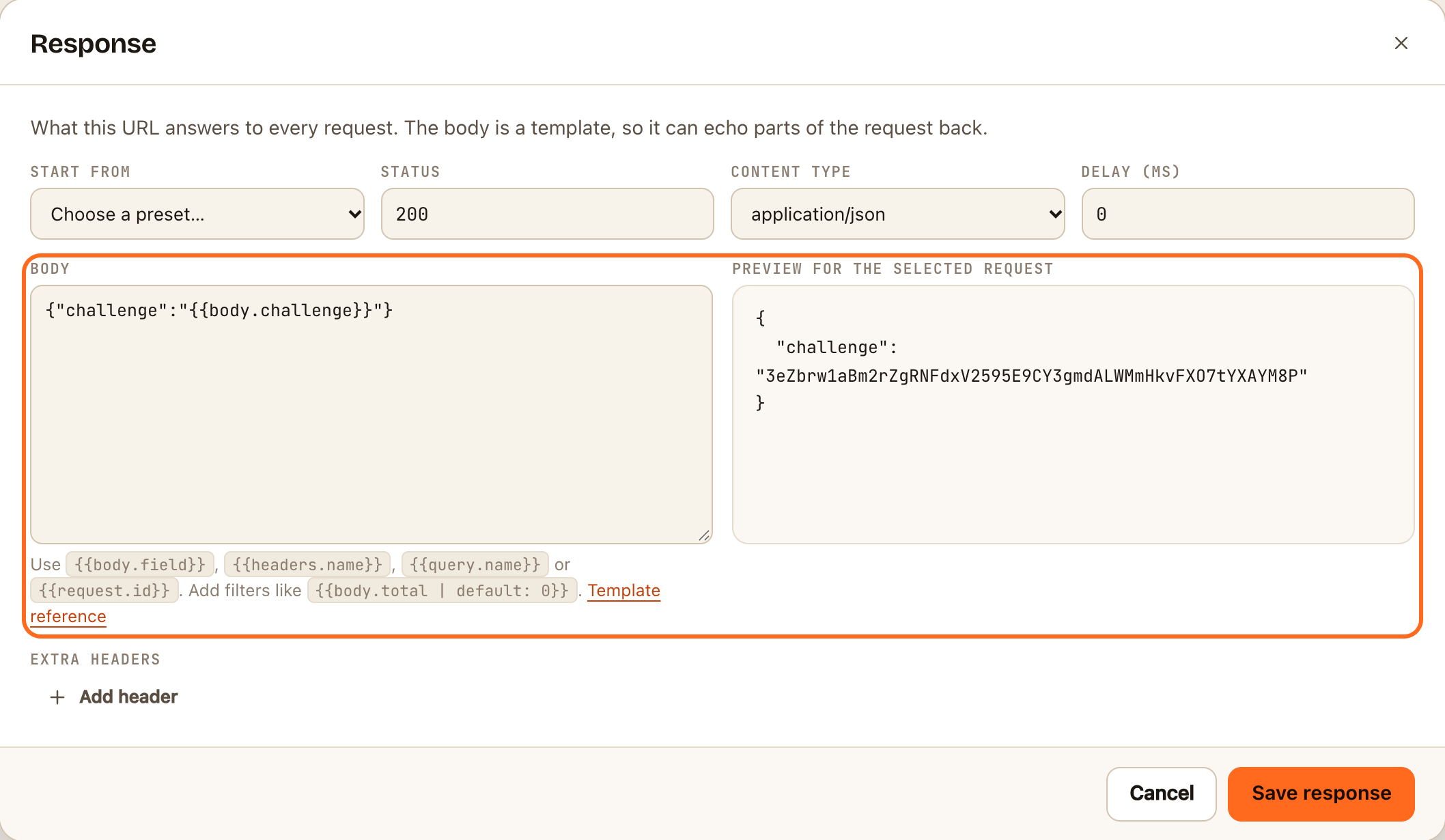
- Click Response in the toolbar.
- Under Start from, choose the preset for your service. It fills in the status, content type and body.
- Click Save response.
- In the service, paste your webhook URL and save it, or click its Verify button.
Check it worked
- The service accepts the URL. Slack shows Verified, and Meta saves the callback URL without an error.
- In the inspector, the challenge request appears in the list. Open it to see exactly what the service sent.
Things worth knowing
- You can leave the preset in place. The response applies to every later request too. For Slack, later events simply get
{"challenge":null}with a200, which Slack accepts as a successful delivery. For Meta and Microsoft Graph, later deliveries get an empty200, which they also accept. - Meta's verify token isn't checked. Meta sends the token you chose, and a real server should compare it. webhook.stream answers the challenge whatever the token is. You can see the token on the request's Query tab.
- Twilio doesn't verify URLs, but it does read your response. The Twilio TwiML reply preset answers an incoming SMS with a message.
If something goes wrong
- The service still says the URL didn't respond correctly. Open the challenge request and check the method and where the challenge is: in the body for Slack, in the query string for Meta and Microsoft Graph. Make sure the preset matches.
- Meta says the URL couldn't be validated. Meta's check is a
GET, and the Response applies to it like any other request. Confirm the preset was saved before you clicked Verify and save. - Nothing arrived at all. The service couldn't reach the URL, or it was pasted incompletely. See Requests aren't showing up.